
This page is public, project-specific, and it depends on the URL shown in the Address field. It displays information about the project linked to that URL, a Login link, and other links and features. After login the projects you may access will appear in a dropdown list above the menu bar (see also URL Address and Page Layout).
NOTE: The features described here are those of Internet Explorer 6. The number and order of lines and commands differ slightly in Internet Explorer 7 (IE 7).
The first line displays the name of the system (Study Tracking and Review System
The second line is the browser's menu bar.
The third line may be the browser's Standard Buttons toolbar. You may show or hide it from the toolbar right-click menu. Right-click on a toolbar and check or uncheck Standard Buttons to show or hide it (i.e., simply click on Standard Buttons).
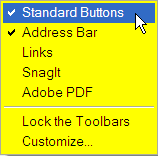
The next line may be the Address Bar. You may show or hide it from the toolbar right-click menu. Right-click on a toolbar and check or uncheck Address Bar to show or hide it. See also URL Address.
Then there is a thicker line that may display logos and words, indicating the default project to which the first page is linked.
The Login link is at the right end of the line. Click Login to launch your STaRS pages.
Then the screen layout depends on project, but it may be divided into columns: the left column, titled About, displays information about the project; the right column may display a project summary and announcements. Depending on project there may also be other columns or rows.
Under the columns there are other links: links to US Government agencies and STaRS administrative links.
The following are links to US Government agency home pages.

The National Cancer Institute,
The US Department of Health and Human Services,
The US Government
The following are links to Westat and STaRS administrative pages.
Westat
Contact Us, and
