
After login your personal STaRS home page will appear (see also First Page). The first page depends on the default project to which it is linked. From the Select Another Tracking Tool dropdown you may select the projects to which you have access.
NOTE: The exact number and order of lines may differ depending on browser and selected toolbars. The STaRS layout DOES NOT depend on the browser. If your browser is Internet Explorer 6, the following is the layout.
The first line is the browser's title bar.
Underneath is the browser's menu bar.
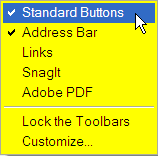
The next two bars may be visible or not. They are the Standard Buttons and the Address bar. If they are not visible, right-click on the menu bar and select them from the menu.
Then there comes the STaRS title bar. On this bar there is a welcome message and links to My Account, Logout, and Help.
If the default project is different from the desired project, select the project in the Select Another Tracking Tool dropdown.
The menu bar is located under the project dropdown. Menu items being selected are highlighted in reverse colors, whereas selected items are highlighted against a darker background.


The
menu depends on the project. Some items
The space below the menu may display, on the Home
page, an About summary of the
project
Links to federal agencies and to STaRS administrative pages are visible at the bottom of almost all STaRS pages.
